The process
1. Live demonstration. No obligation, on your own example: a real absence from the notification arriving to the shift being covered. After that you know whether it fits.
2. Two days of consulting on site. Not a software workshop but process work: how does absence management run in your hospital today, who decides what, which rules apply. The configuration comes out of that.
3. Configuration and training. The system, the app and the info screens are set up and the key people are trained — organizers, team administration, HR management.
4. Go live. After that the system is ready to use. No installation, no maintenance window, no IT project.
If the decision has already been taken, go-live can happen at very short notice.
For large hospitals: in stages
A hospital with many wards does not introduce HLth.care across the whole site in one day, but in stages — each of which is useful in its own right:
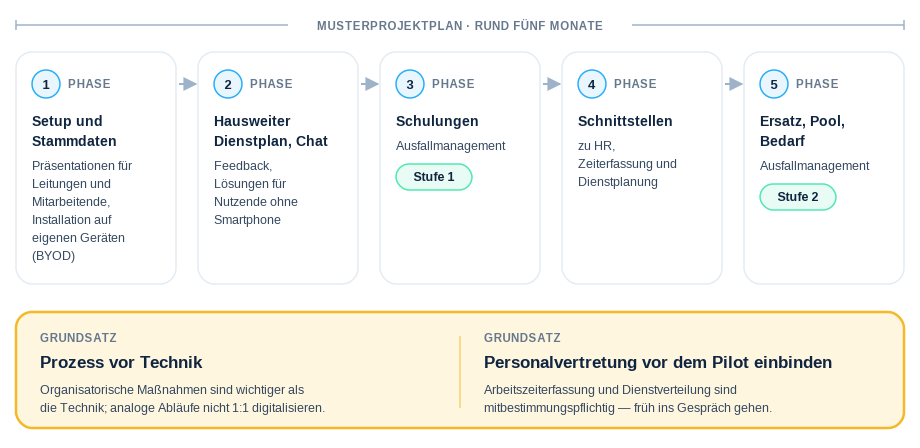
- Setup: introduction to leads and staff, master data, the app on people’s own devices.
- Hospital-wide roster and chat, with solutions for staff without a smartphone.
- Training and absence management, stage 1.
- Interfaces to HR, time recording and rostering.
- Stage 2: replacement, pool and demand.
Two principles have proved themselves: process before technology — analogue routines are not simply copied into digital form, they are clarified first. And: staff representation belongs at the table before the pilot, not after it.
What your hospital has to contribute
Honestly: more organisation than technology.
Settle the roles. Who is an organizer, who a team administrator, who HR management, who staff representation? That is the most important preparation, because rights hang off it.
Settle the shift types and times. Per team: which shifts exist, with which times, which category, which colours. The category decides whether a shift can be exchanged, whether it can be tendered, and how its hours are calculated — that is the setting worth taking time over.
Decide the rules. Does a shift exchange require approval? May staff enter shifts themselves, or only as an offer? Are differing shift times allowed? Does time recording run, and with or without location?
Involve staff representation — early. Working time recording and shift distribution are subject to co-determination. There is a role of its own for staff representation; that is a good way into the conversation. → For staff representation
Tell your staff. A broadcast before the start saves the first wave of questions.
Your people do not have to create their own accounts. Where the email addresses are available, your hospital creates the accounts — one by one in the portal, or all at once through the connection to your planning system. Staff get an email, set a password and are in. That removes the biggest point of friction at the start: you are not waiting for 400 people to register individually. → Connecting to existing systems
The stumbling blocks of the first few weeks
From the experience of the hospitals using it — all three are organisational, none of them technical:
Incomplete profiles. Anyone who does not complete her profile and privacy settings is not found when teams are being invited. That is the most common case in week one, and a clear note at the start avoids it.
The lead who keeps phoning. Understandable, but it destroys the advantage. The value comes from asking everyone suitable at the same time, not the three you know.
Expecting a holiday request. “Report absence” is a sick note, not a holiday request. If that is not said, people enter their holiday there and trigger an absence case. One sentence in the training prevents it — the function used to be called “report absence” and was renamed for exactly this reason.
When it pays off
From the first absence you no longer solve on the phone. The benefit does not come from one big change but from a small daily one — which is why starting with a single ward or department is a common route.
What you do not need
- No server, no database, no installation
- No software distribution to end devices
- No interface — running entirely without one is possible
- No change of your rostering system
- No change of your payroll system