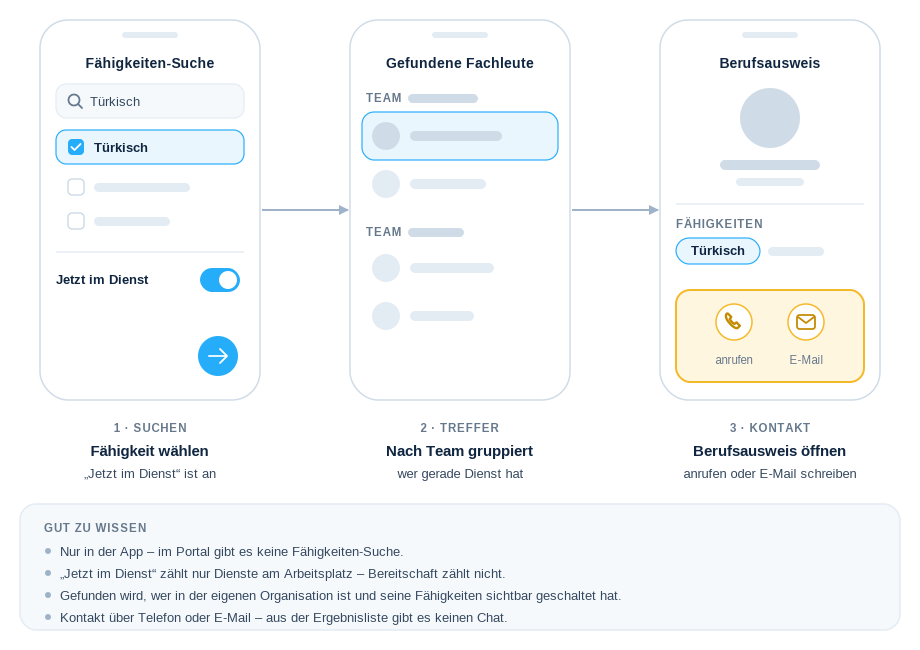
How it works
Choose a skill. In the app, under Search users by skills, you select one or more skills: a language, a specialist qualification, a device.
Only people who are working right now. The Now on duty switch is on by default. It shows only people who have a shift at the workplace at this moment. Anyone who is off or on call does not appear — switch it off and you see everyone.
Contact with one tap. The results appear grouped by team. A tap opens the Professional Card, and from there you call or send an email.
What is behind it
The basis is the digital Professional Card, which each person maintains herself: profession, skills, additional qualifications. The search covers your organisation, across all teams and wards.
Each person decides through her privacy settings whether she can be found. Phone number and email address are visible only to those she has shared them with.
What you should know
- App only. The portal has no skill search.
- On-call does not count as “on duty”.
- There is no chat from the list; contact runs by phone or email.