Your morning with HLth.care
5:40. The sick note arrives in the app, not as a call. You see it the first time you look at your phone — with the period and, if it was uploaded, the doctor’s note.
5:45. You open the absence. Every affected shift is listed one under the other, with date, shift type and time. Nothing to piece together, nothing to work out.
5:47. You decide per shift: stays as it is, is dropped, goes to a colleague, goes to the pool, goes out to tender. For the rest of the day a bulk decision applies the same route to all open shifts.
5:48. Done. The people asked get a push notification. Anyone already working that day was never asked.
Later. The applications come in. One click awards the shift; the person is in the roster, in the team and in the chat.
In that time you have woken nobody and given nobody a guilty conscience.
What the team calendar takes off your hands
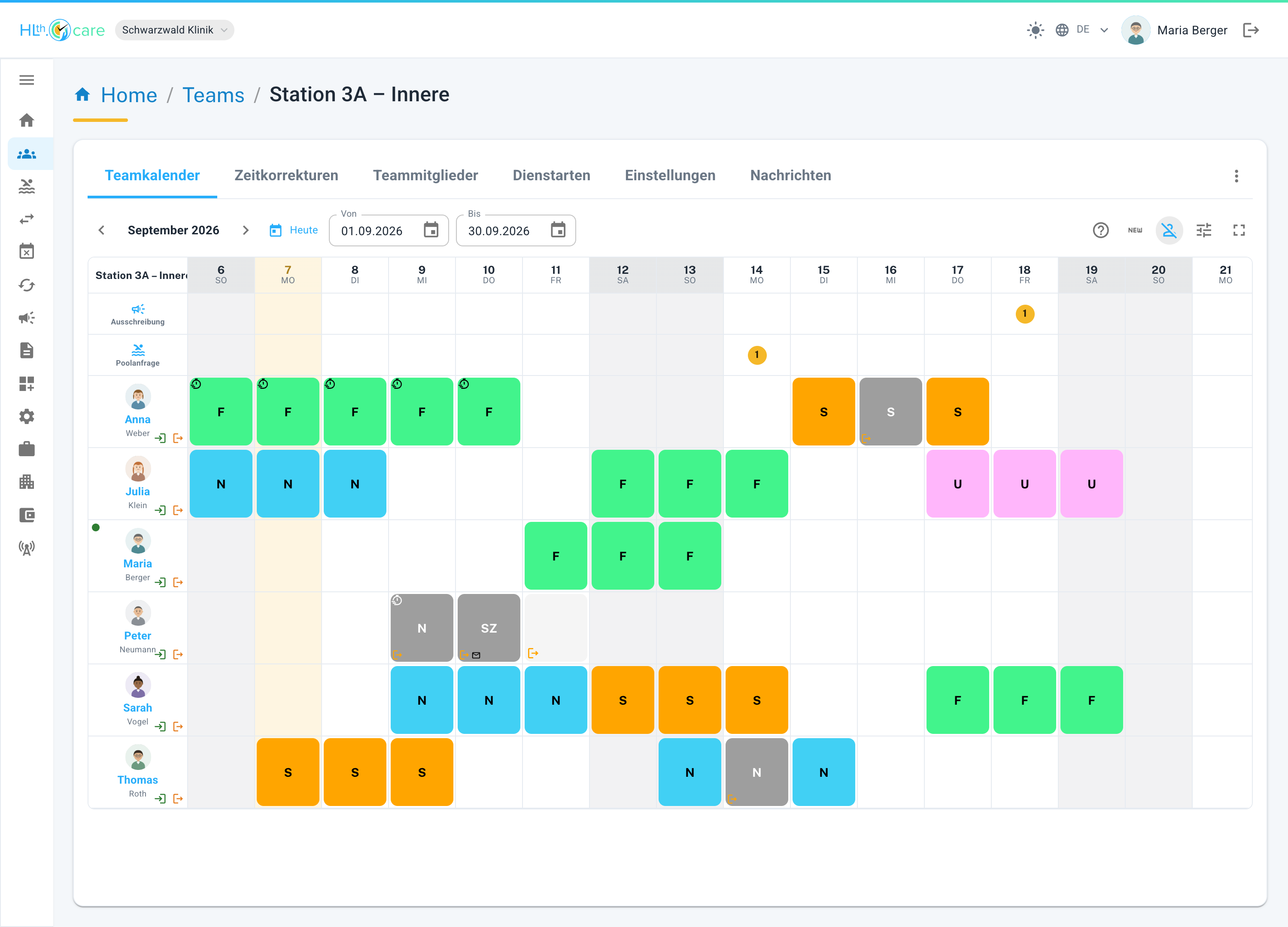
The team calendar in the portal is a matrix: one row per person, one column per day.
- Drag across several days and enter them in one go.
- Drag a shift to another day or another person. Immediately on a computer; on a tablet with a short press and a confirmation that names the shift and both sides.
- Above the member rows sit rows of their own for tender and pool request — open needs are where you are looking anyway.
- The calendar works on a tablet just as it does on a computer, in light or dark mode.
Where you save time without noticing
Shift exchange runs without you. Two people agree in the app. You only come in if your hospital requires an approval — and then with the full picture rather than a slip of paper.
Preferred shifts enter themselves. Where you allow it, staff enter shifts themselves, optionally as an offer waiting for your approval.
The chat replaces the WhatsApp group. And message to organizer is the channel that brings you requests without thirty people reading along.
The board maintains itself. The notice in the switchboard is always current without anyone printing it.
At the end of the month
Check time corrections, correct, approve the month, pull the export. Three things to know beforehand:
- Pull the export before you approve. An incorrect entry can be corrected but not deleted — both values appear in the export.
- The approval is final and applies per person and month.
- Do not approve in the middle of a running shift. The person concerned would then be unable to clock out.
Two things that confuse people at first
A multi-day sick note is one case, not a chain. Four days of sick leave appear as one line 14.09.–17.09. with all the affected shifts underneath — one page, one bulk decision, one save. Decisions are still made per shift, because on day three you often need different cover than on day one.
“My shifts” does not refresh by itself. What a team member does in the app is picked up. If you change something, she sees it only when she leaves the page and opens it again. The team calendar in the app has a refresh button at the top right for this.
What you need
The organizer role for your team. For shift types and team settings, team administrator as well — those are deliberately two roles, and anyone who needs both gets the combined one.
You work in the portal at app.hlth.care. You need the app for your own shifts, not for working on the team.